Guide
How to Spot a Fake Banking App Before You Download It
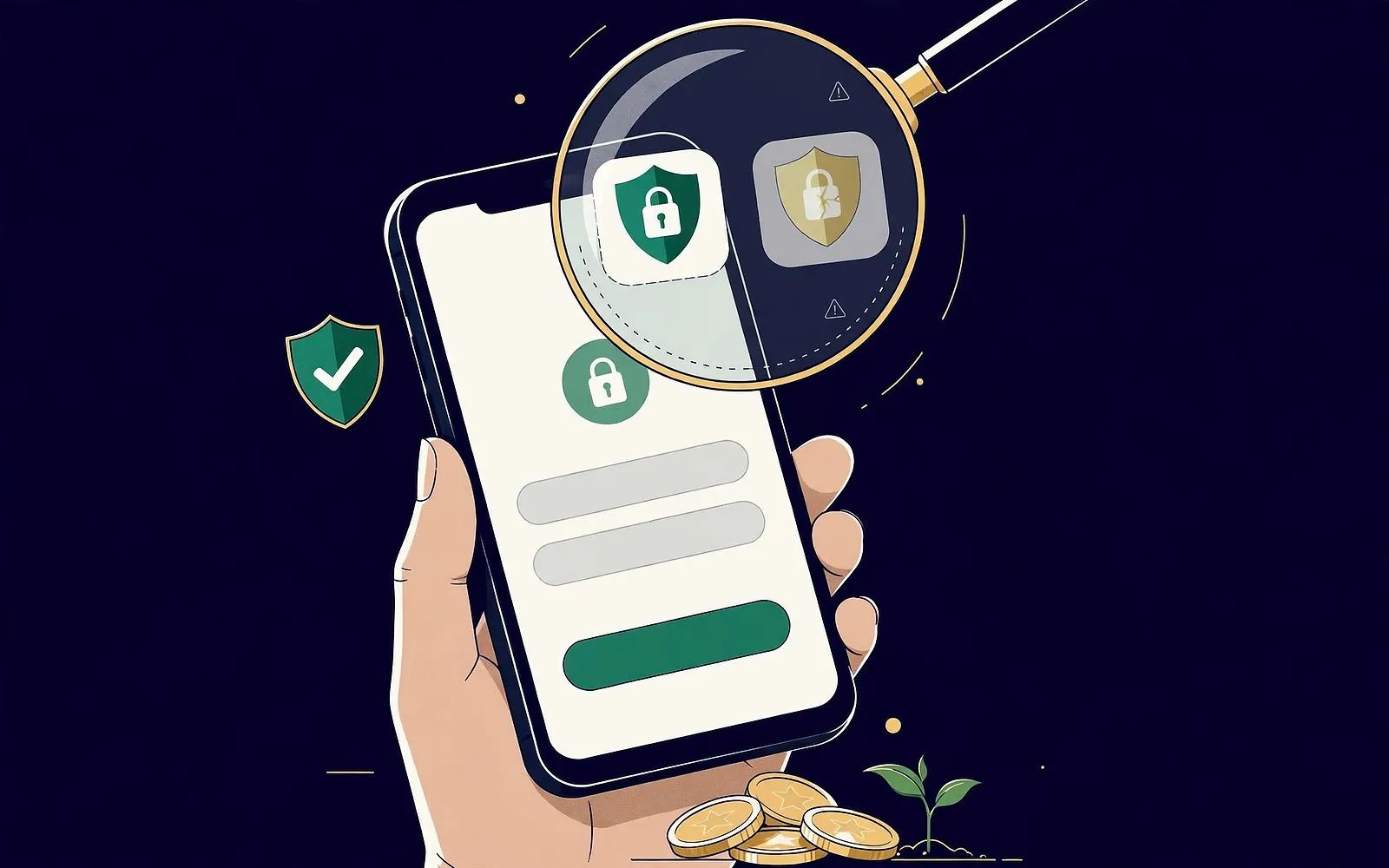
Fake banking apps copy your bank's logo, colours and login screen — then steal your password and one-time codes. Do this 60-second check before you tap install.
In this article
- How a fake banking app reaches your phone
- 1. A clone sitting in the official store
- 2. A sideloaded APK from a message
- 3. The bait-and-switch update
- The 60-second check before you tap install
- 1. Start from your bank's own website
- 2. Read the developer name, not the app name
- 3. Check the download count and the age
- 4. Read the reviews — especially the bad ones
- 5. Check the permissions before you install
- 6. Check the spelling, the icon and the screenshots
- 7. Cross-check the firm on the regulator's register
- Real app vs fake app: the quick comparison
- Permissions: what is normal and what is a red flag
- What to do if you already installed one
- The seller-side version of the same scam
- Frequently asked questions
- Key takeaways
Your bank's app is the front door to your money — and criminals have learned to build a convincing copy of that door. A fake banking app looks like the real thing: same logo, same colours, same login screen. The difference is what happens after you type in your password. The copy sends it straight to a criminal, who logs in as you, reads the one-time code your bank texts you, and moves your money out before you have finished your coffee.
This is not a rare edge case. The US Federal Trade Commission says consumers reported losing $12.5 billion to fraud in 2024, and imposter scams were the most commonly reported fraud category, with $2.95 billion lost to impersonation scams alone. Google blocked 1.75 million policy-violating apps before publication in 2025 and banned 80,000 developer accounts. Apple removed roughly 166,000 apps in 2025, with fraud behind 54% of those removals, and says it stopped more than $2.2 billion in potentially fraudulent transactions that year. The stores are filtering hard — and fakes are still getting through.
The good news is that a fake banking app is almost always catchable before you install it. The check takes about a minute, and it works on both iPhone and Android. Here is how the scam works, and the exact checks to run.
How a fake banking app reaches your phone
There are three main routes, and the right defence depends on which one you are facing.
1. A clone sitting in the official store
Scammers submit an app to Google Play or the Apple App Store that copies a real bank's name, icon and screenshots, sometimes with a tiny variation — an extra word, a letter swapped, a hyphen added. It passes review, often because it looks harmless at first, and then changes behaviour after approval. Apple added a new App Store rule (2.5.19) in October 2026 specifically against apps with hidden or undocumented features, after a WIRED investigation in November 2026 mapped a network of more than 400 apps that posed as ordinary tools while hiding other functions. The lesson: a listing in an official store is a filter, not a guarantee.
2. A sideloaded APK from a message
This is the most dangerous route, and the most common for banking theft. You get a text, WhatsApp message or email — a courier alert, a tax notice, a prize offer, a message pretending to be from your bank — with a link to download an app file (an APK on Android). Installing it means allowing your phone to install software from an unknown source. That step alone is the biggest warning sign: no real bank, courier or government department asks you to install an app through a link in a message.
Once installed, these apps ask for permissions a banking app has no business needing all at once — Accessibility services, permission to draw over other apps, SMS access, notification access, device admin rights. Those permissions let the app lay a fake login screen over your real banking app, record what you type, and read the one-time codes your bank sends. In September 2026, security firm Malwarebytes documented the Gigabud trojan doing exactly this: victims were talked into sideloading a fake airline, tax or government app, and a second component cloned the victim's real banking app into a hidden work profile so the theft happened inside a copy of the genuine app.
3. The bait-and-switch update
Some apps arrive looking legitimate — a PDF reader, a cleaner, a document scanner — and only later download the banking thief. Security researchers found this pattern repeatedly in 2026: document-reader apps that quietly downloaded Anatsa, a banking trojan that lays fake login screens over 831 banking and finance apps, and a related trojan, Albiriox, that targeted more than 400 financial apps. The app you installed was not the app that stole from you. That is why the checks below matter even for apps that are not pretending to be your bank.
An app store listing is a filter, not a guarantee. Google blocked 1.75 million policy-violating apps in 2025 — and fakes still got through. The one-minute check below is the layer the store cannot do for you.
The 60-second check before you tap install
Run these seven checks in order. Any single failure is a reason to stop; two is a reason to delete the listing from your mind entirely.
1. Start from your bank's own website
Do not start from a link in a message, an advert, a search result or a QR code. Type your bank's web address yourself — or use a bookmark you already trust — and follow the bank's own link to its app. The Federal Trade Commission gives the same advice for retailers: search for the app on the company's own website, because the company will send you directly to the correct store listing. If a caller or a message is pushing you to install something right now, that urgency is itself a red flag.
2. Read the developer name, not the app name
In Google Play and the App Store, the publisher line is far harder to fake than a logo or a title. A fake app can copy the name "HSBC" or "Chase" in the title, but it cannot publish under the bank's developer account. Tap the developer name and check that it matches the bank's legal entity — for example, Monzo is published by "Monzo Bank Limited". Then tap through to the developer's other apps: a real bank's account lists its own apps; a scammer's account often lists a jumble of unrelated apps, or just the one fake. Watch for near-misses in the name itself: "SBl" with a lowercase L instead of a capital I, an extra hyphen, or a word like "Mobile" or "Banking" bolted on.
3. Check the download count and the age
A real banking app has millions of downloads and years of history. A fake has hundreds or thousands, and a recent "released" date. If two similar-looking apps appear, the one with the huge install base and the long history is the real one. A brand-new app claiming to be a bank you have used for years should stop you cold.
4. Read the reviews — especially the bad ones
Real banking apps have thousands of reviews that argue about real things: slow logins, a feature that moved, a redesign people hate. Fake apps often have a handful of glowing five-star reviews written in the same style, sometimes posted in a burst, or no reviews at all. The FTC's advice is blunt: if an app has no reviews, it could be fake. Read the one-star reviews first — they are the hardest to fake convincingly, and real users of a clone often report that their login "didn't work" or that the app asked for odd permissions.
5. Check the permissions before you install
On the store page, look at what the app wants to access. A genuine banking app needs the camera (to scan cheques or verify your identity), notifications, and sometimes biometrics. It does not need Accessibility services, permission to draw over other apps, access to your SMS messages, your call logs, or your contacts. Accessibility and screen-overlay permissions are the two that matter most: they are what let a trojan draw a fake login screen on top of your real app and read what you type. If a banking app asks for either, do not install it.
6. Check the spelling, the icon and the screenshots
Fake apps are often built in a hurry. Look for misspelled words in the description, odd spacing, a logo that is slightly off-colour or low-resolution, and screenshots that look like stock images rather than the real app. Compare the icon with the one on your bank's own website — a genuine app's icon matches exactly. Small differences are the whole game here: the scammer is betting you will not look closely.
7. Cross-check the firm on the regulator's register
In the UK, every bank and e-money firm operating legitimately is on the Financial Conduct Authority's Financial Services Register, with a reference number and contact details. If an app claims to be from a firm, look the firm up and compare the contact details on the register with the ones in the app listing — clone operations often copy a real firm's name and number onto their own site, but the contact details rarely match. The FCA also publishes a warning list of unauthorised firms, worth searching before you install anything that handles money. In the US, you can check whether a bank is real through the FDIC's BankFind tool; in the EU, your national regulator keeps a similar register.
The one rule that beats all seven checks: never install a banking app from a link. Go to the bank's own website, or search the store yourself and verify the developer. If the app reached you through a message, treat the message as the scam — even if the app itself turns out to be real.
Real app vs fake app: the quick comparison
| What to check | Real banking app | Fake banking app |
|---|---|---|
| Developer name | The bank's legal entity (e.g. "Monzo Bank Limited") | An individual, a generic studio, or a near-miss name |
| How you found it | Your bank's own website or a store search you ran yourself | A link in a text, WhatsApp message, email or advert |
| Downloads | Millions, built over years | Hundreds or thousands, recently published |
| Reviews | Thousands, mixed, about real features | Few or none; a burst of identical five-star reviews |
| Permissions | Camera, notifications, biometrics | Accessibility, screen overlay, SMS, call logs, contacts |
| Spelling and icon | Clean copy, exact logo | Typos, off-colour or blurry logo, stock screenshots |
| Regulator register | Firm and contact details match | Details do not match, or the firm is on a warning list |
Permissions: what is normal and what is a red flag
| Permission | Normal for a banking app? | Why it matters |
|---|---|---|
| Camera | Yes | Cheque scanning and identity checks |
| Notifications | Yes | Transaction alerts and security messages |
| Biometrics / fingerprint | Yes | Logging in securely |
| Accessibility services | No — red flag | Lets an app read your screen and type for you |
| Draw over other apps | No — red flag | Lets an app lay a fake login screen over the real one |
| SMS access | No — red flag | Lets an app read your one-time codes |
| Call logs / contacts | No — red flag | No banking function needs these |
| Device admin rights | No — red flag | Makes the app hard to remove |
What to do if you already installed one
If you suspect an app on your phone is fake — or you installed a banking app from a link and something feels off — act in this order, and do it from a different device if you can.
- Do not log in again. Every login hands the scammer a fresh password and a fresh one-time code.
- Call your bank on the number on the back of your card — not a number from the message or the app. Tell them you may have entered your details into a fake app. They can freeze the account, block transactions and issue new login credentials.
- Change your password from a clean device, and change it anywhere else you reused it. Turn on two-factor authentication using an authenticator app rather than SMS where your bank offers it.
- Uninstall the app, then run a security scan. On Android, check Settings for any app with Accessibility or device-admin rights and revoke them before uninstalling — a malicious app with device-admin rights will resist removal. On iPhone, delete the app and check for unfamiliar configuration profiles in Settings.
- Check your statements line by line for the next few weeks. Small test transactions — a few pounds or dollars — are often how thieves check whether stolen details work before taking more.
- Report it. In the US, report to the FTC at ReportFraud.ftc.gov and the FBI's Internet Crime Complaint Center. In the UK, report to Action Fraud and check the FCA warning list; the Chartered Trading Standards Institute told LBC that around 500 reports of crimes involving fake banking apps had reached Action Fraud over the previous three years. In India, call the cybercrime helpline 1930 or report at cybercrime.gov.in. In Pakistan, report to your bank and the State Bank of Pakistan, which has repeatedly warned customers never to share PINs, passwords or card details. Also report the app in the store so it is taken down before someone else installs it.
Never let anyone talk you into disabling your phone's protections. Scammers routinely tell victims to turn off Google Play Protect, allow "unknown sources", or grant Accessibility access "so the app can work". A real bank never asks you to weaken your phone's security to use its app. If someone is asking you to do that, you are being scammed — hang up.
The seller-side version of the same scam
Fake banking apps are not only aimed at account holders. In the UK, criminals have used fake banking apps in person: a buyer shows a seller a convincing payment screen on their own phone and walks off with the goods. The payment never happened. If you sell anything face to face, never accept a screen, a screenshot, a notification or a "reference number" as proof of payment. Check your own account, in your own app, before the goods leave your hands. Pay.UK, which runs the UK's Faster Payment System, says funds are usually available almost immediately — so if the money is not showing on your side, it has not arrived.
Frequently asked questions
Can a fake banking app appear in the official Google Play Store or Apple App Store?
Yes. Both stores review apps before publication, but fakes still get through — Google blocked 1.75 million policy-violating apps in 2025, Apple removed about 166,000, and some apps pass review and change behaviour afterwards. A store listing lowers the risk; it does not remove it. Always verify the developer name and start from your bank's own website.
My bank texted me a link to download its app. Is that safe?
Do not use it. Banks do send texts, but criminals send identical-looking ones, and there is no reliable way to tell them apart on a phone screen. Ignore the link, open your bank's website yourself, and download from there. A real bank will never mind you arriving by the long route.
What permissions should a real banking app never ask for?
Accessibility services, permission to draw over other apps, SMS access, call logs, contacts and device admin rights. A genuine banking app needs the camera, notifications and biometrics. Accessibility and screen-overlay permissions are the two most dangerous, because they let a malicious app fake a login screen and read what you type.
I installed an app from a link and entered my password. What do I do first?
Call your bank immediately on the number on the back of your card and tell them your details may be compromised. Do that before you uninstall anything or change any passwords — the bank can freeze the account first, which stops the thief using the details while you clean up. Then change your password from a different device, uninstall the app, and check your statements for small test transactions.
Are iPhones safe from fake banking apps?
Safer, not safe. iPhones cannot sideload apps from links the way Android phones can, which closes the most dangerous route. But imposter apps have still appeared in the App Store, and the 2026 WIRED investigation showed bait-and-switch apps reaching iPhone users too. iPhone owners should run the same developer and download-count checks.
Key takeaways
- A fake banking app copies your bank's logo, colours and login screen — then sends your password and one-time codes to a criminal.
- Never install a banking app from a link in a text, WhatsApp message, email or advert. Start from your bank's own website.
- Check the developer name, download count, reviews and permissions before you tap install — any one failure is a reason to stop.
- Accessibility, screen-overlay and SMS permissions are the red flags that matter most; a real banking app never needs them.
- If you already entered details into a suspicious app, call your bank first, then change passwords from a clean device and report it.
Your bank's app is the most sensitive app on your phone. It deserves sixty seconds of suspicion before you install it — and zero trust in any link that arrives uninvited. The check is quick, it is free, and it is the one layer of protection no app store can provide for you.
Sources
- FTC — fraud losses 2024 ($12.5B; impersonation most reported)
- Try Abel — Fake Banking App Scam UK: Two Types, Three Checks
- FraudGuard — Fake Banking Apps Scam in Pakistan
- Aditya Birla Capital — How to Spot and Avoid Fake Apps
- Anuraag Singh — Fake Banking App Scam: How to Identify and Avoid It
- UMA Technology — How to Spot Fake Android Apps Before You Install Them
- Komando — The 2026 list of malicious Android and iPhone apps
- Citizen — Over 2 million apps pulled by Google and Apple
- Hazetec — Brand Impersonation Attacks Expand into the App Store
- Nextgov — FTC: Your Holiday Shopping Apps Might Be Fake
The MoneyHabit editorial desk researches, writes and reviews every article against our editorial policy.
The Sunday Habit
One useful money idea, every week.
A short, practical email every Sunday — no spam, no selling your address, unsubscribe anytime.
Advertisement
More in Financial Technology
Financial Technology · News
Your Payday App Wants to Be a Bank: Dave's Charter Bid
Dave filed to become a national bank on 16 November. Here's what the charter would change for its users — and why consumer groups are alarmed.
19 November 2026 · 10 min read
Financial Technology · Explainer
Open Banking in Practice: What Apps Can (and Can't) See
You tapped 'connect your bank' — but what did you actually agree to? Here is exactly what apps can and cannot see, and how to take access back.
11 November 2026 · 12 min read
Financial Technology · Explainer
What Happens to Your Money When Your Bank App Goes Down
When your bank app goes down, your money is still there — but you cannot reach it. Here is what an outage breaks and how to build a backup plan.
7 November 2026 · 11 min read